Anadea: A Script Font for Elegant Web Design
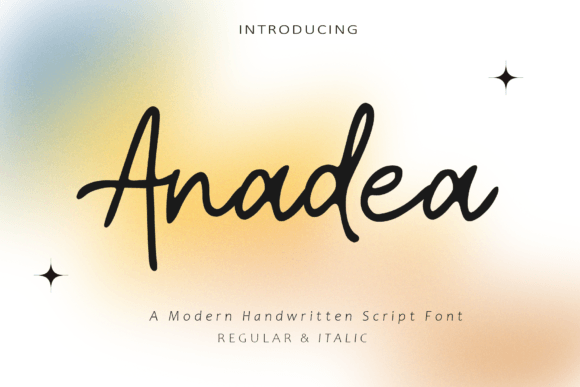
As a web designer, I’m always on the lookout for fonts that bring personality to a site without sacrificing readability. Anadea is one of those rare finds—a script font that feels both refined and approachable. It’s perfect for adding a touch of sophistication to headers, call-to-action buttons, and branding elements without overwhelming the user experience.
Testing Anadea in a Hero Section
I recently used Anadea in a hero section for a boutique online store. The font’s flowing curves gave the headline a soft, inviting feel that complemented the brand’s aesthetic. On desktop, it looked elegant and balanced, while on mobile, it maintained clarity without appearing too delicate. It worked especially well when paired with a clean sans serif for the subtext, creating a visual contrast that guided the eye naturally.
Using Anadea for Call-to-Action Buttons
When testing Anadea on CTA buttons, I found it performed well in larger sizes. The font’s swashes and ligatures added a decorative flair that felt intentional rather than distracting. However, I noticed that in smaller button sizes, some of the details got lost. For best results, I recommend using it for primary buttons or headings rather than secondary navigation elements.
Anadea on Image Overlays and Banners
One of my favorite uses of Anadea was over an image banner for a digital course landing page. The font’s light weight made it easy to read against busy backgrounds, and its graceful lines added a sense of refinement. I also experimented with dark and light text versions. On dark backgrounds, the font had a subtle elegance, while on light ones, it felt more modern and crisp.
Pairing Anadea with Other Fonts
Font pairing is key when working with a script like Anadea. I often pair it with a simple sans serif like Montserrat or Open Sans for body copy. This creates a balance between the decorative elements of the script and the clean, readable structure of the sans. For a more editorial look, I’ve used a serif font like Playfair Display alongside Anadea, which gave the design a timeless, professional feel.
Considerations for Responsive Design
When designing responsively, it’s important to test how Anadea scales across different screen sizes. On larger screens, the font shines in headlines and section titles. But on smaller devices, I found that reducing the font size too much can make it harder to read. I recommend keeping it at least 24px for optimal legibility and avoiding using it in dense layouts where multiple text elements compete for attention.
Accessibility and Readability
While Anadea is visually appealing, it’s not ideal for long blocks of text. Its decorative nature makes it unsuitable for body paragraphs or detailed instructions. However, as a display font, it excels in short phrases, titles, and logos. When using it in web projects, I always ensure there’s enough contrast between the text and background and avoid placing it over complex images or patterns that might interfere with legibility.
Real-World Applications for Anadea
From portfolio sites to product landing pages, Anadea has proven versatile. I’ve used it for a creative agency’s homepage, a coaching website’s hero section, and even a blog header. Each time, it brought a sense of authenticity and style that aligned with the brand’s identity. It’s especially effective in minimalist designs where a single, striking typeface can define the entire look.
Commercial Use and Licensing
If you’re planning to use Anadea in a commercial project, be sure to check the licensing terms. Most fonts come with specific guidelines for web use, so it’s important to confirm that it’s allowed for your intended purpose. Some versions include webfont formats like WOFF or WOFF2, which are essential for fast-loading websites. Always verify that the font supports the languages and characters you need for your audience.
Final Thoughts on Anadea
Anadea is a strong choice for web designers looking to add a personal, elegant touch to their projects. It’s not a font for every use, but when placed thoughtfully, it can elevate a design in a way that feels both unique and professional. Whether you're building a brand site, a digital product page, or a creative portfolio, Anadea offers a fresh, stylish option that stands out without being over the top.